Getting Started as an Organiser
What Is an Organiser?
Convention organisers are users who have been granted the ability to create and manage conventions on RisingCon. As an organiser you can:
- Create new conventions using the setup wizard.
- Build a custom landing page with sections, images, and a FAQ.
- Configure a registration form with custom question types.
- Manage participant registrations, check-ins, and data exports.
- Build a visual schedule grid with sessions.
- Customise the colour theme and branding.
- Add translations for multilingual conventions.
- Manage the full run lifecycle from draft through to archive.
Becoming an Organiser
Anyone with a RisingCon account can create a convention — no special permission is needed. However, your convention must be approved by a platform administrator before it can go live.
Well-established conventions are usually approved quickly. For new or lesser-known conventions, the admin may reach out to verify the event's legitimacy before approving. This process exists to ensure the platform remains a trusted space for participants.
Your Organiser Dashboard
Once you have organiser access, a My Conventions section appears in your dashboard. Clicking Open Dashboard on any convention opens its organiser dashboard, which has a sidebar with the following sections:
Sidebar
├─ Convention
│   ├─ Overview
│   ├─ Setup Wizard
│   └─ Participants (when run exists)
├─ Features
│   └─ Feature Settings
└─ Settings & Archive
    ├─ Convention Settings
    └─ Archive
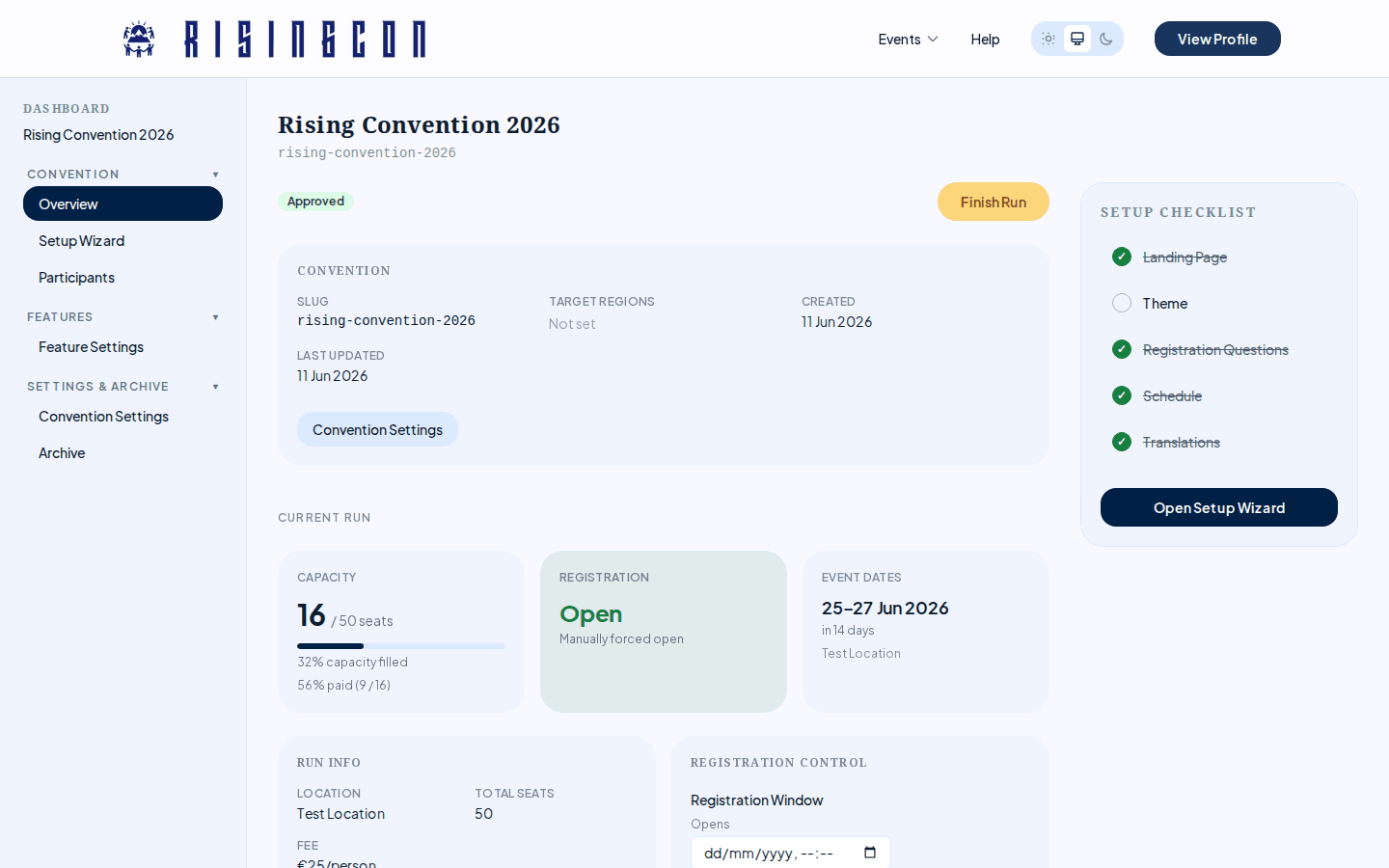 The organiser dashboard overview showing convention status, current run details, and the setup checklist
Convention and Run Lifecycle
Conventions go through a lifecycle before they go live. Understanding this flow is important.
Convention Statuses
| Status | Meaning |
|---|---|
| Draft | Being prepared. Not visible to the public. |
| Pending | Submitted to the platform admin for review. |
| Approved | Approved by the admin. Runs can now be created. |
| Rejected | Rejected by the admin. The denial reason is shown in the dashboard. |
| Archived | No longer active. Hidden from public listings. |
Run Statuses
A run is a specific occurrence of a convention (a particular set of dates and location). The lifecycle:
Draft → Pending → Approved/Denied
                        ↓
                     Active → Finished → Archived
You cannot activate a run until both the convention and the run itself have been approved by a platform admin.
First Steps Checklist
- Create your convention using the Create Convention form.
- Submit the convention for admin review.
- Once approved, create a convention run with dates and location.
- Submit the run for admin approval.
- Once both are approved, use the Setup Wizard to:
- Build your landing page.
- Set your colour theme.
- Configure registration questions.
- Set up the schedule.
- Add translations (if needed).
- Activate the run to open registration.